Showing posts with label apps. Show all posts

Monday, 10 February 2014

Posted by Unknown | File under : , ,
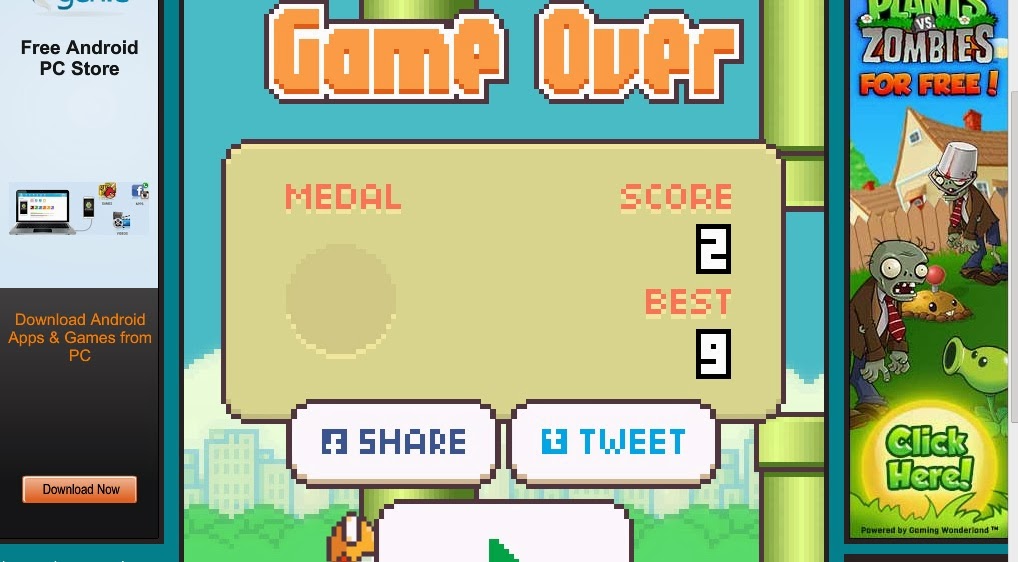
If you haven't played flappy bird yet or missed out your download ticket to flappy bird before the game got deleted, there's a website which allows you to play the game online on PC without a android phone.

You can play it online by Clicking Here.


Preview of the Online Version


Posted by Unknown | File under : ,
The creator of the game Flappy Bird just tweeted on his twitter profile that he'll be taking the game down, which had reached number 1 free app on Apple store and Google playstore. Hearing this news made me think " I wonder who sued them? " so I decided to check on his twitter profile once more for new tweets and just as expected, he tweeted that he does not have any legal issues. He wants to live a simple life and all that attention ruined his peaceful life. Although now the game has been removed, you can still play it online by clicking here.


What man in his right mind would want to cut down a tree which grows $50k $$$ every day. He could generate enough money in a month to live a high life for the rest of his life. You could notice how everyone wanted to buy the game soon as the creator announced he was giving up on the game. So this means no more torture of seeing flappy bird highscores everywhere. Good guy Flappy Bird Creator. 

Amount of Revenue Flappy Bird was Generating


Monday, 3 February 2014

Posted by Unknown | File under : , ,
There is a reason why our parents say games are a waste of time..


Introducing a new iOS and Android game called "Flappy Bird" which has a simple look and has gone viral throughout the world. But what's the catch? The game is nearly impossible to master and trying to complete the game over and over again. The gameplay is very addicting and you would want to keep playing after losing several times, espically when you get into comparing scores with your friends. Believe me, if you get 25 score. That's a lot. I barely reached 5. The soundtrack of the game consists of birds flapping and a dinging noise when you pass a obstacle.

This game is free although there advertisements, but the adverts dissappear when you're actually playing the game so no biggy.

How do we play this game?

By tapping your phone, dying and restarting. There are no enemies in this game, only giant green poles.


Objective of the Game?

Your objective is to keep the bird airborne and avoid the pipes as you move forward. You keep the bird on air by tapping on the screen and the more pipes you avoid, the higher your score. It sounds simple..but when you play it you'll learn it's easier to keep a aeroplane with one wing only in air than this bird.


To be honest, if you actually enjoyed playing this game you need to get yourself checked. This is far by the most useless game in history.


Click Here to Download this from Google Playstore at YOUR OWN RISK.

Update: The game has been removed from the app store and no longer available for download.

But you may play this game online by clicking here, made by another person which is exactly the same game.


Thursday, 23 January 2014

Posted by Unknown | File under : , , ,
Have you ever wanted to use Android Apps on your computer? you looked everywhere but still can't find the right software, they're either fake or paid version. Well you've come to the right place, here I'll be demonstrating on how to use Android Apps on your PC for free. That's right, no charges or anything. Only takes a few clicks to download and install.


Bluestacks is a popular android emulater for PC which doesn't require a lot of hassle to install, has a simple interface and you can use install almost every android application available on playstore, including Viber and Whatsapp.

There are a lot of games and apps that aren't released for PC yet, but with this software you'll be able to use those apps on your PC without having to touch your phone at all.

Images:


How to install Bluestacks:


  1. Download Bluestacks from their Official website here
  2. After you've finished downloading, install it. Note: You will need to be connected to the internet during installation.
  3. Run Bluestacks and start downloading your apps. :)


Leave your questions and feedback here on the comment box and I'll try to answer them all. :)


Monday, 13 January 2014

Posted by Unknown | File under : , ,
Here's my top 10 list of the Android apps you must have on your phone.

Note: This is not a official list, this is my own personal top 10 list. To download these apps, simply search them on Google play store and install.


10. Kongregate Arcade


Kongregate Arcade is a free app available on google playstore where you can download over 400 flash games for free. The advantage of Kongregate Arcade is you can find entertaining and fun games with just few clicks! If you're bored of playing subway surfers & temple run all day and want new games, you should definitely check out this app.


9. Kindle for Android


You do not need to own a Amazon Kindle to use this app, only a Android phone. This app is amazing and has built-in features such as Dictionary, Google and Wikipedia. You can read Free E-books or choose to buy. Kindle also lets you sync your books, so the next time you open the e-book you'll start off where you left. 

8. News 


Depending on where you live, it wouldn't hurt to install the national news app (I recommend BBC) to stay updated on what's happening especially if you have no time to watch news on the TV.


7. Ask.FM 


You may not have heard about ask.fm yet, but it's a social networking site made in 2010 which has become very popular now. The site was succeeded by Twitter, 65 percent of the Ask.fm users are mainly twitter users. The site is simple to use, you just ask questions it's your choice whether you want to reveal your name or be anonymous when asking questions. It's pretty fun, definitely worth checking out.


6. BBM Messenger for Android


After a long wait, BBM for both Android and iOS has been released and reached over 10 million downloads in it's FIRST DAY which is pretty amazing. This is a good alternative to Kik Messenger, although BBM users have dropped down past the few weeks. Most users, including me installed the app, registered and disappeared the next week. Though I don't blame BBM, talking to friends on multiple Instant Messengers seems like having 5 remotes for the same TV.


5. WhatsApp


WhatsApp is a popular text messaging alternative. It's simple to use, has a nice interface and it's free!
Although you need to be connected to the internet to use WhatsApp which shouldn't be any problem, since there's WiFi signals walking around everywhere. ;)


4. Twitter


Unless you're living in a cave, you must know that Twitter is the new internet sensation and grabs the news headlines more than 3 times per week. If you're a frequent user of Twitter but use Twitter on Desktop. Don't ask or think, install this app NOW. Desktop and Mobile version of Twitter has a difference in design, the rest of the features are the same. The advantage of having Android Twitter is you won't have to turn on your computer every time you think off something to tweet. Remember, it's alright to share your thoughts on Twitter, even when you're going to the bathroom. People won't judge you for tweeting that. Been there, done that.

3. Kik Messenger


This is one of my personal favorite Instant messenger for my phone. Kik messenger is fast and simple to use. Has a lot of features such as Mini-games, Stickers (Big emojis) Etc The conversations save on phone, so if you lose your phone and you login to Kik with the same account on a new phone the old conversation won't be there anymore.


2. Chrome


Yep that's right, Chrome for Google. Three words Android users have been waiting for. Chrome gained a lot of reputation from desktop users for being reliable to use. Mobile version is fully touch and is similar to the Desktop version.

1. Facebook


Pretty obvious that Facebook was going to be included in this list. Facebook already comes installed with most phones since it's the leading social media website on the internet. If you're active on Facebook or you admin a page, it's recommended you install the Facebook app so it's easier for you to check on your buddies or your facebook page.


So that's all for now, hope you enjoyed this post. Remember to leave feedback on what you think about this post on the comment section below and if you have suggestions on what Top10 list we should make next, Contact Us here.

If you liked this post, you may also like: